1. Go to the Home Page
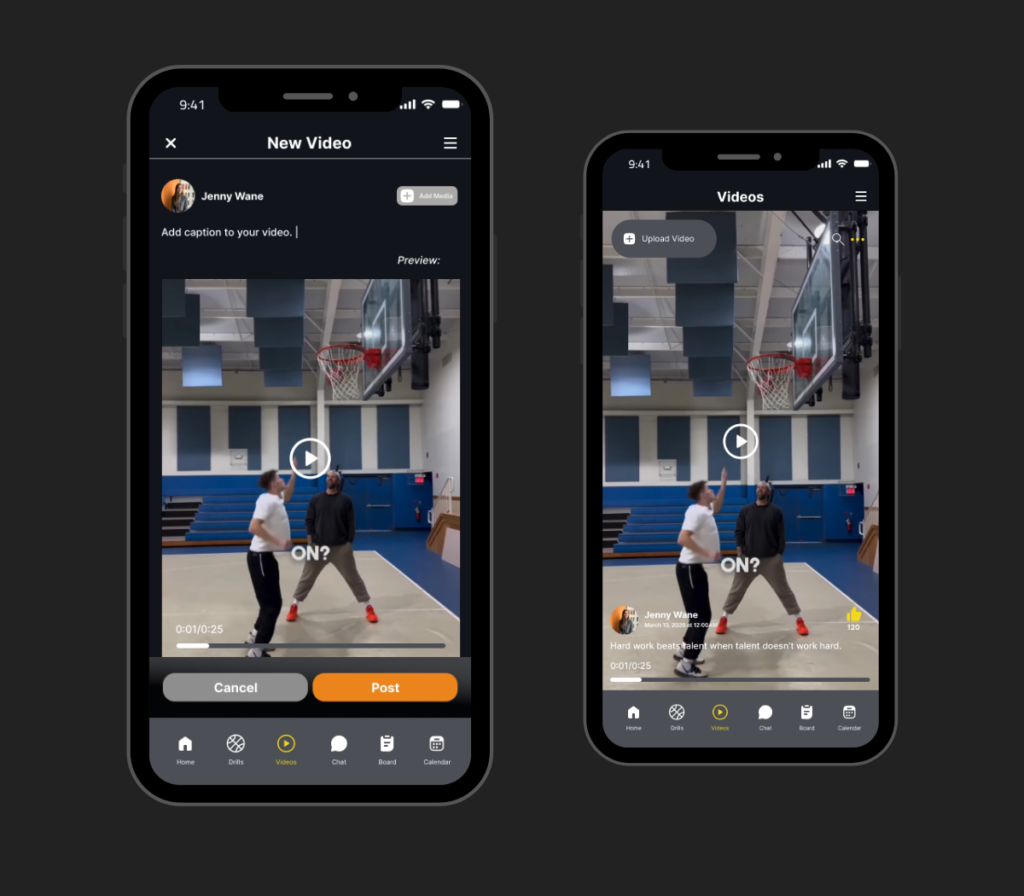
Start by opening the Video Menu from the navigation bar of the app. This section is dedicated to basketball-focused short videos that combine learning, inspiration, and community engagement in one place.
2. Scroll Through Videos
Once inside, browse through a continuous feed of short-form videos uploaded by players and coaches. These may include highlights, training clips, drills, and performance showcases designed to help you learn and stay motivated.
3. Learn from Content
Take time to observe each video carefully. Focus on the techniques, movements, and tips being demonstrated, as these insights can help you improve your own basketball skills and understanding of the game.
4. Upload Your Own Video
If you want to share your progress, tap the upload button to add your own clips. This allows you to showcase your training sessions, game highlights, or skill development with the community.
5. Add Captions or Details
Before posting, include a caption or description to explain your video. This gives context to viewers, helping them understand what your content is about or what skill you are demonstrating.
6. Publish Your Content
Once everything is ready, publish your video to make it visible to the GroPro community. Your content will then appear in the feed where others can view and engage with it.
7. Engage with Videos
Stay active by liking, commenting, and interacting with other users’ videos. Engaging with content helps you connect with the community and learn from different playing styles and training approaches.