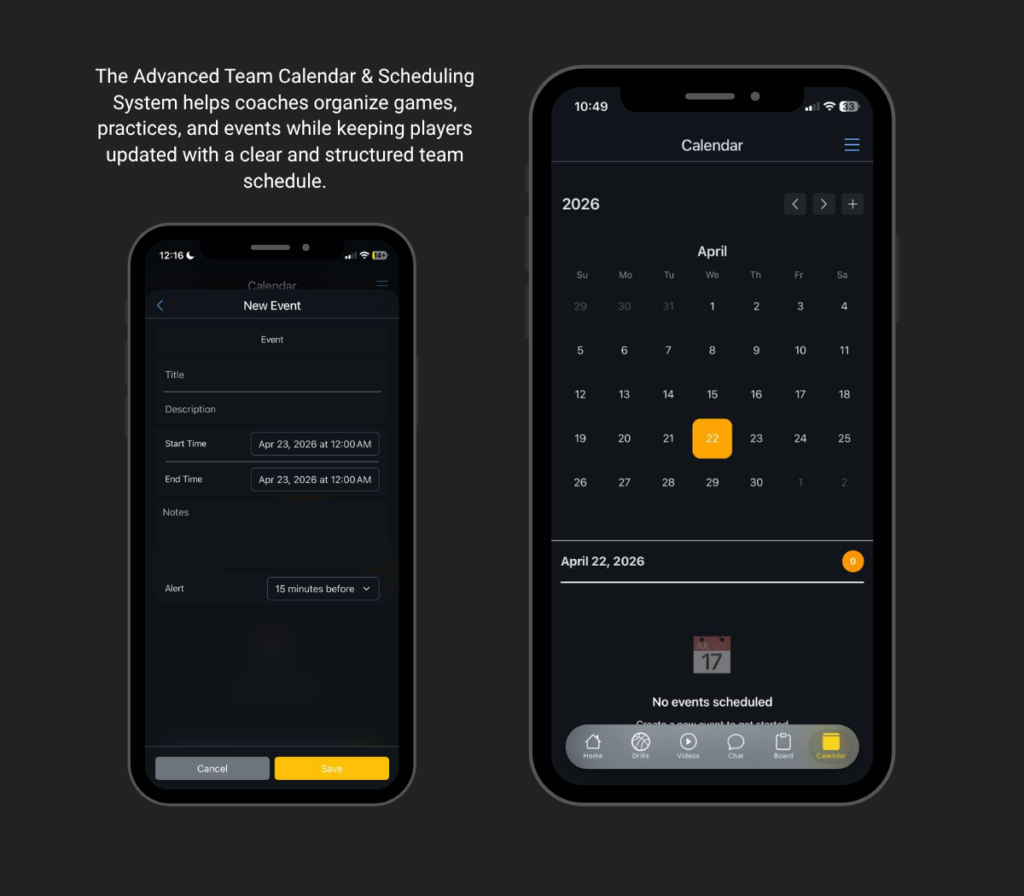
1. Open the Calendar Feature
Begin by navigating to the Calendar section from the app’s main menu. This is where all scheduled events for your team are displayed in an organized and easy-to-view format.
2. Create a New Event (Coach)
Coaches can create new events such as games, practices, meetings, or special team activities. This ensures that all important schedules are properly planned and communicated.
3. Set Date and Time
Enter the exact date and time of the event. Providing accurate scheduling details helps players manage their time effectively and avoid missing important activities.
4. Add Event Details
Include additional information such as the event location, specific instructions, or reminders. This gives players a clear understanding of what to expect and how to prepare.
5. Save the Schedule
Once all details are complete, save and publish the event. The schedule will then be officially added to the team calendar.
6. Players View the Schedule
After the event is posted, it will automatically appear on the players’ calendar. This ensures that everyone on the team has access to the same updated schedule.
7. Stay Updated and Organized
Regularly check the calendar to stay informed about upcoming events. This helps both coaches and players remain organized, prepared, and on track with team activities.