1. Access the Team Board
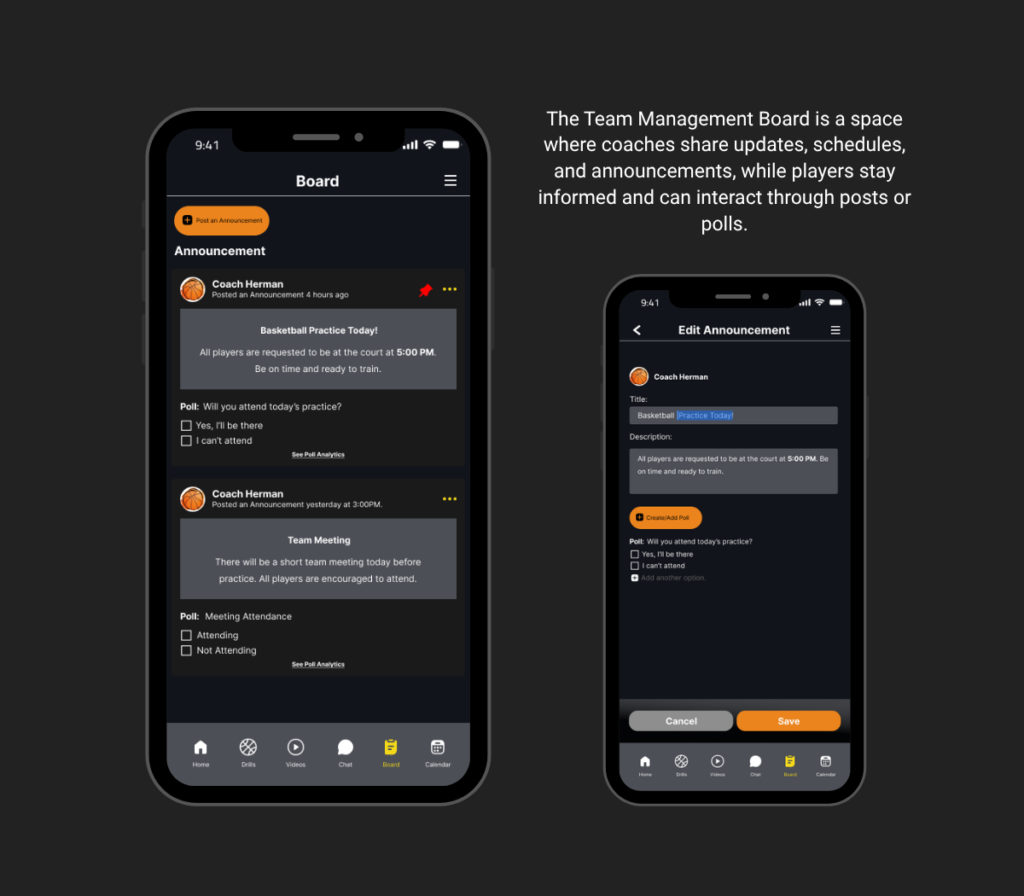
Start by entering the Team Board section from your assigned team inside the app. This area is exclusive to your team, ensuring that all shared information remains organized and accessible only to relevant members.
2. Create or View Announcements
Coaches can post official announcements such as training schedules, game updates, reminders, or team instructions. Players, on the other hand, can easily view and stay updated with all posted information in real time.
3. Post Team Updates
Important updates like practice changes, game preparations, or team reminders can be shared through the board. This helps ensure that all members receive the same information at the same time.
4. Create a Poll or Voting Option
Coaches can also create interactive polls or voting options within announcements. This feature allows teams to make decisions more efficiently and encourages player participation.
5. Players Participate
Players can respond to announcements by voting on polls or engaging with posts. This interaction helps build teamwork and ensures every member has a voice in team-related matters.
6. Monitor Engagement
Coaches can track player responses and see who is actively participating. This helps in assessing team involvement and ensuring that everyone is staying updated and engaged.
7. Keep Everyone Informed
Regular use of the Team Board ensures that all communication stays clear, structured, and centralized. It becomes the main source of truth for everything happening within the team.